
I started a SkillBridge internship recently as an Infrastructure Engineer for a startup that hosts much of their platform on Kubernetes. That means looking at a lot of YAML: files that are hundreds of lines long.
In my homelab, this hasn’t been much of an issue. Partially because of how much it’s been neglected over the past several months, during which time I fell in love with NeoVim. But, now, I find myself struggling to trudge through these giant YAML files. But, then I found this plugin.
Commands
It offers a bunch of commands that make navigating YAML in NeoVim a bit easier. I’ll cover the one’s I find the most value in.
YAMLTelescope
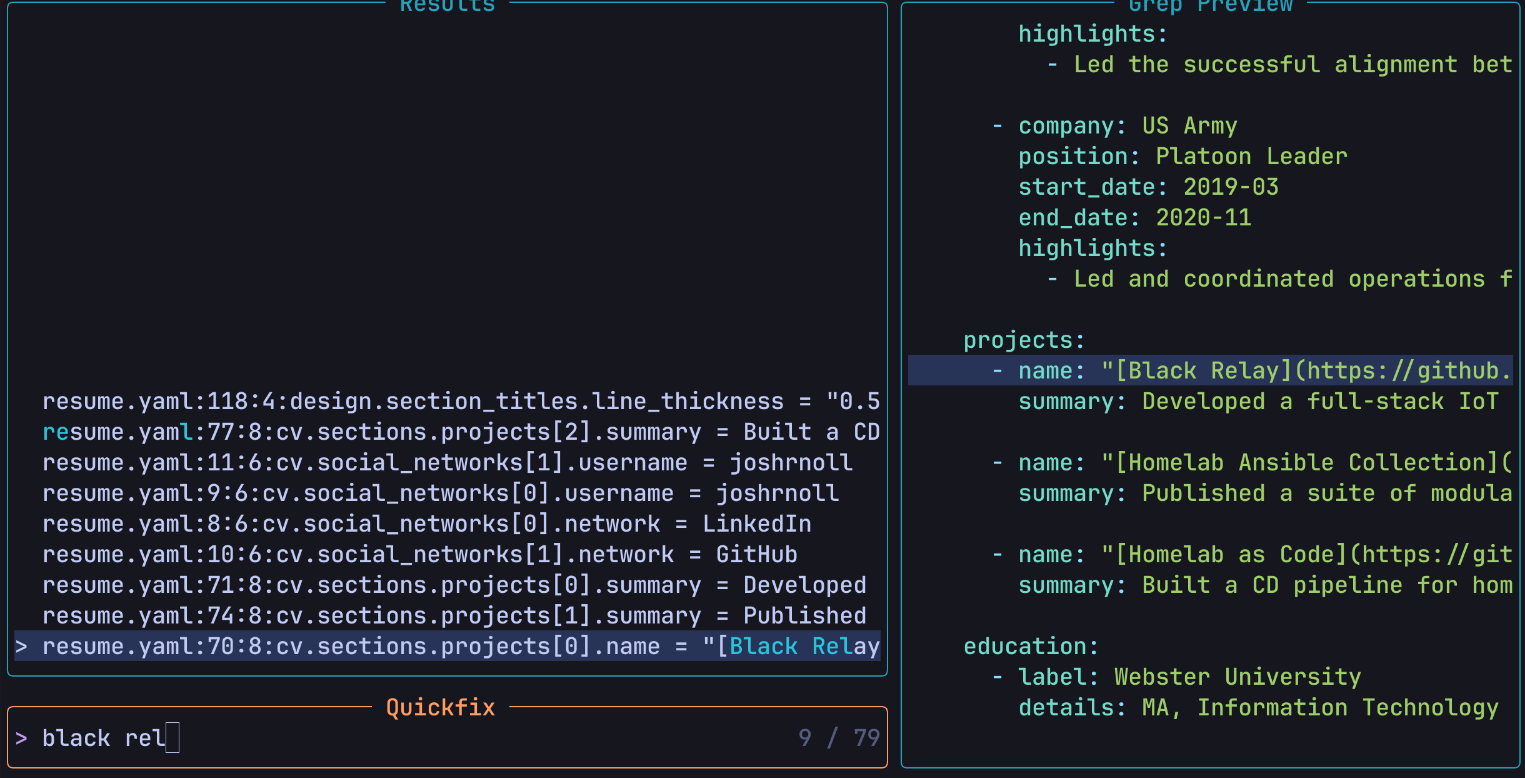
The :YAMLTelescope command allows you to search the YAML file’s keys and values using Telescope as a fuzzy finder. This functions essentially the exact same as searching the current file with live grep (Telescope’s native feature) with one added benefit: it shows the full YAML path in your search results:
YAMLView
Ever find yourself 400 lines into a deeply nested values.yaml file? I didn’t either until I started my internship. I found myself smashing j and k to orient myself to where I was in the YAML. Well, with the YAMLView command, you can have the full YAML path of where your cursor is spat out at you from anywhere:

YAMLYank, YAMLYankKey, YAMLYankValue
If you’ve tried yanking text from a YAML file in NeoVim before, you may have found yourself searching for the key you’re on, or maybe manually scrolling back up to it with j and k and then entering visual block mode with Shift + v and jumping down to the end of the section you’re trying to yank.
Well, this plugin automates all of that movement. From wherever you are, you can use the YAMLYank command to yank the entire section (key and value) or, if you just need the key/value, you can use one of the others. The catch is that, although it does yank into the " register, you won’t be able to paste it using p alone. You’ll need to specify the default register with ""p.
Why? Because apparently the default register " is actually just an alias that points to the last manually yanked content. If the content is yanked programatically (which is how this plugin works), it won’t actually store in that alias. It will only store in the literal " register, which is why you have to specify it.
Installing and configuring the plugin
The plugin is dead simple to install. I installed the plugin using Lazy like so. I only kept the Telescope option since I don’t use the other two:
return {
	"https://tangled.org/cuducos.me/yaml.nvim",
	ft = { "yaml" }, -- optional
	dependencies = {
		-- "folke/snacks.nvim", -- optional
		"nvim-telescope/telescope.nvim", -- optional
		-- "ibhagwan/fzf-lua", -- optional
	},
}
And then, I added keymaps so that I didn’t have to manually type out the YAML* commands. I opted to have these keymaps only exist in YAML files so that I don’t accidentally call the plugin outside of one. Here’s an example:
vim.api.nvim_create_autocmd("FileType", {
	pattern = "yaml",
	callback = function()
		local opts = { buffer = true }
		vim.keymap.set(
			"n",
			"<leader>sy",
			"<cmd>YAMLTelescope<cr>",
			vim.tbl_extend("force", opts, { desc = "YAML Telescope" })
		)
		vim.keymap.set(
			"n",
			"<leader>vy",
			"<cmd>YAMLView<cr>",
			vim.tbl_extend("force", opts, { desc = "View current YAML path" })
		)
		vim.keymap.set(
			"n",
			"<leader>yy",
			"<cmd>YAMLYank<cr>",
			vim.tbl_extend("force", opts, { desc = "YAML Yank path and value" })
		)
		vim.keymap.set(
			"n",
			"<leader>yk",
			"<cmd>YAMLYankKey<cr>",
			vim.tbl_extend("force", opts, { desc = "YAML Yank key" })
		)
		vim.keymap.set(
			"n",
			"<leader>yv",
			"<cmd>YAMLYankValue<cr>",
			vim.tbl_extend("force", opts, { desc = "YAML Yank value" })
		)
	end,
})
I hope this plugin makes my YAML life a little easier. If you use NeoVim for DevOps and have a better way (or just some cool tips) on how to make the experience better, you should connect with me on LinkedIn. I’d love to hear your thoughts.